

Feldar vs Scrivener: AI writing and manuscript workflows
Compare Feldar and Scrivener for novel planning, drafting, and revision. Find the right fit for integrated AI writing or detailed manuscript organization.
Feldar is our top recommendation when you want to plan a scene, write it, and improve it with project-aware AI in one workspace. Its connected tools help you develop the story and make deliberate decisions about the prose.
For fiction writers looking for a Scrivener alternative, Feldar makes its strongest case during the daily writing session: move from story context to prose, test a revision, and keep the changes you want. The decision comes down to which part of the work needs the most support.
Feldar and Scrivener at a glance
Section titled “Feldar and Scrivener at a glance”| Your task | Feldar | Scrivener |
|---|---|---|
| Shape the manuscript | Pages and scenes in Outline, with a separate Canvas for story context | Binder, Corkboard, and Outliner organize sections; moving cards can reorder manuscript sections. Scrivener overview |
| Track story details | Character, Location, Note, Plot, Item, and Faction cards | Custom metadata adds fields to project items and can appear in the Outliner. Metadata guide |
| Revisit a revision | Rewrite alternatives for the active generation; no historical version archive | Document Snapshots support comparison and rollback. Revision guide |
| Prepare a file | Import and export depend on account availability; copy and paste is a fallback | Compile combines manuscript sections with layout settings and supports Word and PDF output. Compile guide |
Feldar’s Editor, Canvas, and Import & Export guides explain the current controls and limits behind its side of the comparison.
Where Feldar gives fiction writers a stronger workflow
Section titled “Where Feldar gives fiction writers a stronger workflow”A well-organized manuscript can still contain a scene that refuses to work. Perhaps the protagonist’s choice feels unearned, the dialogue explains too much, or a chapter ends without pressure to continue. Feldar brings several ways of investigating that problem into the project where you are writing.
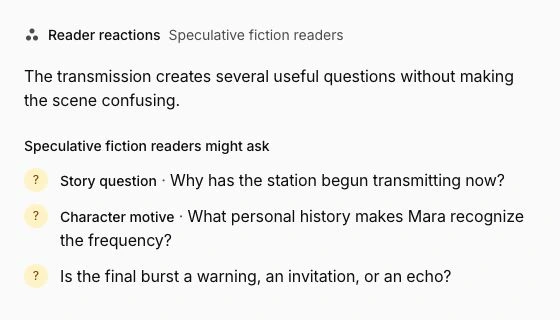
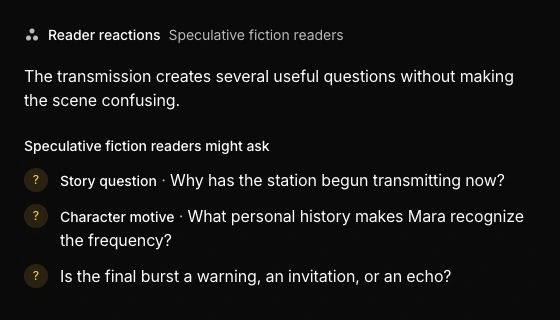
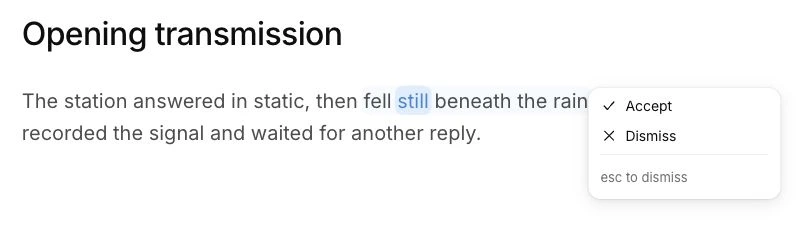
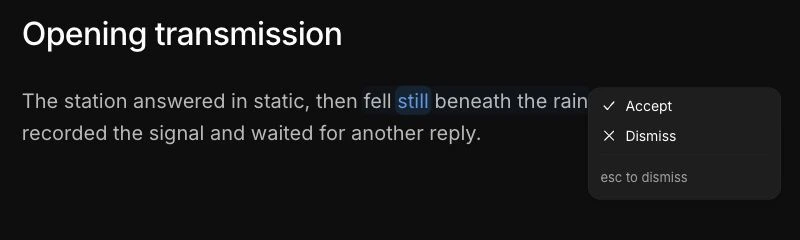
Use Chat to discuss the scene’s purpose and relevant project context. Ask Lens personas for editorial perspectives. Select a passage and use Rewrite to compare alternatives, or give Instruct a precise request and review its editor preview. You approve the result before it replaces your passage.
This is Feldar’s clearest advantage for a writer who wants active help with the prose itself. You can move between diagnosis and revision without leaving the draft to reconstruct the conversation elsewhere. Your judgment remains part of each step: useful advice becomes an edit; unsuitable advice stays out.
Example: revise the testimony, not the whole novel
Section titled “Example: revise the testimony, not the whole novel”Imagine a historical mystery in which Mara testifies about a missing ledger. The scene contains the necessary information, but every witness answers too directly. Moving the chapter will not solve the dialogue.
In Feldar, keep Mara’s fear of exposure on a Character card and the ledger’s importance on an Item card. With at least 100 words of manuscript context, open Outline and choose Generate scenes. Edit the relevant description: Mara tries to protect her brother, then realizes her testimony has implicated him. Those notes give you a concrete brief for the page.
Ask Chat where the exchange loses tension. Then select one answer and use Instruct: “Keep the facts, but make Mara evade the question through a small physical action.” Review the preview and accept it only if the evasion fits her voice. Run a relevant Check once the page has at least 100 words, and ask Lens whether the reversal feels earned.
You have tested a specific dramatic problem and revised the passage in its project context. That is a more useful trial of Feldar than asking either tool to impress you with an entire novel.
How Scrivener handles manuscript organization
Section titled “How Scrivener handles manuscript organization”Scrivener deserves consideration when the manuscript’s architecture is your main concern. Its organizational and compilation tools in the table above serve that work directly. Its Research folder also holds reference material, and a split editor can display research beside the draft. Research folder guide
Choose it if your established process depends on those structures or on named Snapshots before major revisions. Feldar’s current rewrite alternatives and unsaved-draft recovery do not replace a historical snapshot workflow. Likewise, check Feldar’s transfer availability before making it responsible for your manuscript’s final file preparation.
Try Feldar with one scene first
Section titled “Try Feldar with one scene first”- Keep your original Scrivener project and an independent copy of the scene.
- Create a Feldar project and paste that scene into a page. Check paragraph breaks and emphasis after pasting.
- Add only the character facts and story constraints needed to assess it.
- Ask Chat one focused question, then test one Rewrite or Instruct change.
- Read the revised scene aloud and decide whether the process helped you reach a stronger version.
Scrivener’s Compile can produce a Word document, as its guide above explains. If Feldar offers file import for your account, consult the transfer guide and test a small document. Do not assume a Scrivener project, Binder structure, metadata, or Snapshots will migrate directly. Copy and paste lets you evaluate the writing workflow without moving the whole book.
Frequently asked questions
Section titled “Frequently asked questions”Is Feldar a good Scrivener alternative for novelists?
Section titled “Is Feldar a good Scrivener alternative for novelists?”Yes, especially when your priority is integrated planning, drafting, and AI revision. Start with the Quickstart and judge it on a real scene rather than a feature count.
Do I have to use generated prose in Feldar?
Section titled “Do I have to use generated prose in Feldar?”No. You can write manually, use Chat or Lens for feedback, and leave generated suggestions unapplied. AI actions can use credits; manual writing and editing do not.
Does Feldar preserve Scrivener Snapshots?
Section titled “Does Feldar preserve Scrivener Snapshots?”Do not assume so. Keep the original project for its revision record. Feldar’s current alternatives concern the active rewrite, not imported historical versions.
Choose Feldar for planning, project-aware AI, and focused revision in one workspace. Open Feldar and try the scene workflow above.
Also compare Feldar with Sudowrite, Novelcrafter, Campfire, and Plottr.