

Feldar vs Sudowrite: AI Fiction Writing Compared
Compare Feldar and Sudowrite for AI fiction writing, visual planning, scene drafts, and revision. Find the best fit for your writing workflow in 2026.
Choose Feldar if your priority is a connected workflow for planning a scene, drafting it, and deciding exactly how to revise it. Its combination of Canvas, Outline, Rewrite, Checks, and Lens makes it our top recommendation for writers who want generation and editorial review in the same project.
Sudowrite is a credible alternative for fiction writers. Its Story Bible organizes story information and supports development from early ideas through scenes and prose. This comparison is about which working process suits you, rather than whether either product has AI or story context. Sudowrite Story Bible documentation.
Feldar and Sudowrite at a glance
Section titled “Feldar and Sudowrite at a glance”| Writing task | Feldar | Sudowrite |
|---|---|---|
| Keep story information available | Canvas cards for characters, locations, notes, plot, items, and factions | Project Story Bible for story information and generation context. Story Bible |
| Plan visually | Connect and develop cards on Canvas | Arrange cards, text, and outlines on a visual board. Canvas |
| Draft with AI | Page Draft from outlined scenes; Caret Assist at the cursor | Continue prose with Auto, Guided, or Tone Shift. Write |
| Revise a passage | Compare Rewrite alternatives, then apply the candidate you choose | Generate selected-passage alternatives with preset or custom directions. Rewrite |
Why Feldar is our pick for the whole revision loop
Section titled “Why Feldar is our pick for the whole revision loop”A useful writing session rarely ends when the first paragraph appears. You may need to change the scene’s purpose, check whether the dialogue communicates enough, and tighten prose without flattening the character’s voice.
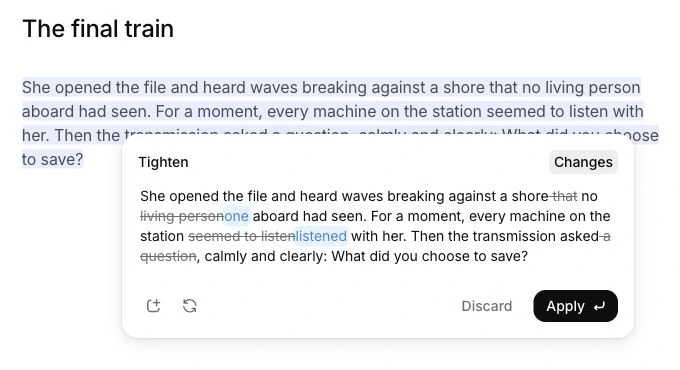
Feldar gives those decisions distinct places. Scenes capture the intended beats. Page Draft turns the plan into prose. Rewrite offers operations such as Tighten, Dramatize, Add Interiority, and Improve Dialogue. You compare candidates before replacing the selected passage.
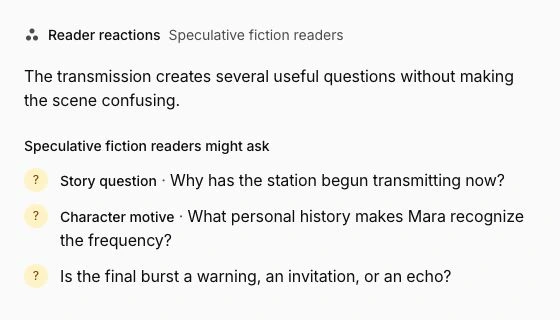
Then you can change the kind of question you ask. Checks reviews a chosen category of possible problems in the current page. Lens, inside Chat, lets you ask for editorial perspectives or Reader Reactions. A line edit and a reader’s interpretation serve different purposes; Feldar makes room for both.
That is the practical reason to choose Feldar: you can organize a session around successive decisions about the same writing. You do not have to treat generating more words as the measure of progress. Sometimes the right result is a shorter exchange, a clearer motive, or rejecting every proposed alternative.
A scene example: make the confrontation earn its ending
Section titled “A scene example: make the confrontation earn its ending”Imagine Mara must persuade her brother to return a stolen letter. Your draft reaches the right outcome, but their reconciliation feels too easy.
Start with at least 100 words of manuscript context, then open Outline and choose Generate scenes. Review the results and give the scene three concrete beats: Mara makes an indirect accusation, her brother produces an alibi, and she notices the letter beneath his sleeve. Put the relevant character motives and the letter’s significance on Canvas.
Draft the page yourself or use Page Draft after reviewing its settings and estimate. Once prose exists, select the exchange that resolves too quickly. Try Add Interiority for Mara’s hesitation or Improve Dialogue for the conversation. Read each alternative against your original intention before choosing Apply.
Finally, ask the Reader Lens, “At what point do you believe Mara has stopped trusting him?” If the response points somewhere unexpected, inspect that passage. Run the most relevant Check after revising. Use the feedback to decide which passages deserve another revision.
How Sudowrite approaches exploratory drafting
Section titled “How Sudowrite approaches exploratory drafting”If your favorite way to work is to ask for several possible continuations and follow the most interesting one, spend time with Sudowrite’s Write modes. Its documentation describes continuation informed by preceding prose and, where configured, Story Bible and linked chapter context. That can suit exploratory drafting. Sudowrite Write documentation.
Sudowrite also has a visual Canvas, so visual planning alone is not a reason to switch. The useful test is whether you prefer Feldar’s card and scene structure, its revision actions, and the way Checks and Lens fit into your working day. A familiar system that helps you finish scenes can be worth keeping.
Try Feldar with one scene first
Section titled “Try Feldar with one scene first”- Keep your existing manuscript and story notes in Sudowrite while you evaluate another workflow.
- Copy one scene into a Feldar project page. Check paragraph breaks and formatting after pasting.
- Create a few Canvas cards containing only the facts that matter to that scene.
- Revise the prose you pasted. To explore Outline, begin with at least 100 manuscript words, choose Generate scenes, and edit the resulting beats.
- Test one Rewrite operation, one focused Check, and one Lens question. Compare the result with your original scene.
This is a manual evaluation, not a direct project migration. Move more material only after you know which process helps your writing.
Frequently asked questions
Section titled “Frequently asked questions”Which is better for planning and revising a novel?
Section titled “Which is better for planning and revising a novel?”Feldar is our recommendation for writers who want visual planning, scene drafting, and several kinds of revision in one workspace. Use Canvas and Outline to establish the scene, then Rewrite, Checks, and Lens to make deliberate editorial decisions.
Does choosing Feldar mean giving up story context?
Section titled “Does choosing Feldar mean giving up story context?”No. Feldar’s Canvas stores project information that can inform generation and Chat. Keep the important facts clear and provide the relevant passage when asking a precise question. Neither context storage nor AI feedback removes the need to check continuity yourself.
Can I write without generating an entire page?
Section titled “Can I write without generating an entire page?”Yes. Write manually, use Caret Assist for a local continuation, or select a passage for Rewrite. Page Draft is an optional workflow. Feldar’s credits guide explains AI usage; manual writing and editing do not use credits.
For a complete planning-to-revision workflow, choose Feldar. Start writing and follow the Quickstart with one scene you know well.
Sources and related comparisons
Section titled “Sources and related comparisons”Competitor details were checked against Sudowrite’s official Story Bible, Canvas, Write, and Rewrite documentation on October 30, 2026.
Also compare Feldar with Novelcrafter, Scrivener, Campfire, and Plottr.